
Over the past few months, we’ve been reorganizing our documentation and code in hopes of making life easier for future project contributors. During this time, we’ve received valuable contributions from software engineering students at the Federal University of Brasília as part of the GCES course project. Thanks, everyone!
And to wrap up the first half of 2026, we’re bringing you a set of “niche” updates—the kind that might not mean much to some, but that address very specific requests from certain community members who are finally being heard. So if you’re curious to learn more about these updates, come join us!
What’s new
Editing Content Extracted from Documents
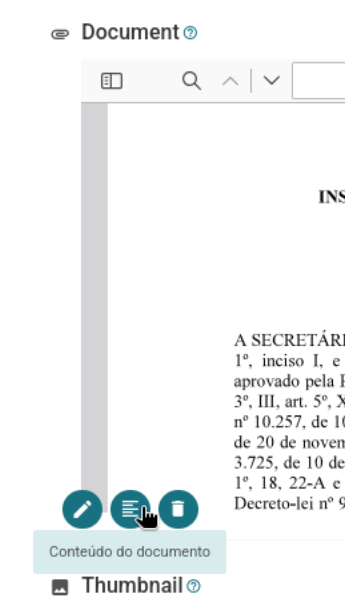
Starting with version 0.12, Tainacan allows text searches within items whose main document is a PDF file. This feature previously had to be enabled via a constant, but more recently it can be enabled through the plugin’s Settings screen. It works as follows: when you upload the PDF file to the item, the document is read by a server-side text extractor, which attempts to process any text content and stores it in a sort of “hidden metadata”, the “Document Text Content.” If everything worked correctly, you can find instances of this text using the simple text search and the advanced search in the “Document” field.
However, this feature has always been hidden from the user. If the text extractor failed to complete its task or if an error was detected, it was impossible to audit the process. To address these issues, we are now making this feature visible in the interface; it will be accessible to the user via a button next to the “Edit” and “Remove” icons for the document:
The pop-up window that opens shows you the processed text content. It will appear in an editable text area, allowing you to make corrections. And if you want to run the extraction again (let’s say the extraction was disabled when your document was submitted), you can request a new extraction right there and check the results.
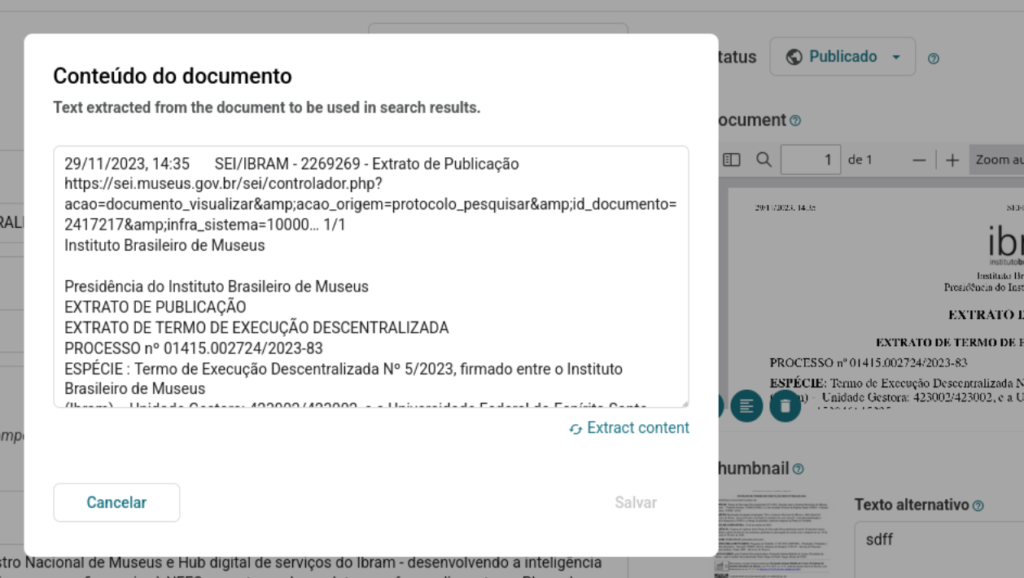
This document extraction uses a file-processing library commonly found on WordPress hosting platforms. However, not all documents work well with it. For example, for PDFs containing images, it does not perform any type of OCR.
With that in mind, we’ve also designed the code so that future plugins can delegate the extraction process to other workflows, where, for example, AI (Artificial Intelligence) algorithms can be used for more advanced detection. And not just to extract documents from PDFs, but also to read data from images or URLs whose content is external.
We’ve already conducted some experiments in this area and plan to release some sample plugins in the coming months. And speaking of AI…
Generating Alt Attributes for Images Using AI
The presence of artificial intelligence tools in our daily lives has radically changed the way we work in some areas. Naturally, we envision a future where these solutions will be integrated into Tainacan to support professionals who catalog their collections in various ways. However, we adhere to some clear principles:
- Artificial Intelligence should be used for the mutual benefit of the professionals who provide the data and the people who use it, and its operation should always be auditable by those who use it;
- As free and open-source software, the plugin should not lock users into a single solution tied to just one company or technology stack;
- Users should be able—even if this requires effort outside the scope of the plugin—to use their own AI solutions to run the implemented features, with the aim of ensuring the autonomy and sovereignty of their data;
Image Alt Attributes (Alternative Text) provide a textual and objective description of what is in an image for situations where the image cannot be seen. They are generally useful when an image has not yet loaded, but above all, they are important for screen reader users, who may not be able to see the image. For many years now, Tainacan has provided a prominent section in its interface where catalogers can enter a description of the thumbnail image, for example. The problem is that, in practice, this field is often left blank, causing the image to be considered merely decorative by screen readers.
It is in this context that we believe AI can help. In our recent tests with a blind user, he told us he had good results using AI-generated image descriptions in his daily life. The WordPress community shares this view, and one of the first features added to the “AI” plugin—maintained by the project’s official developers—was the ability to generate alt text for images uploaded to the media library or inserted into Gutenberg blocks.
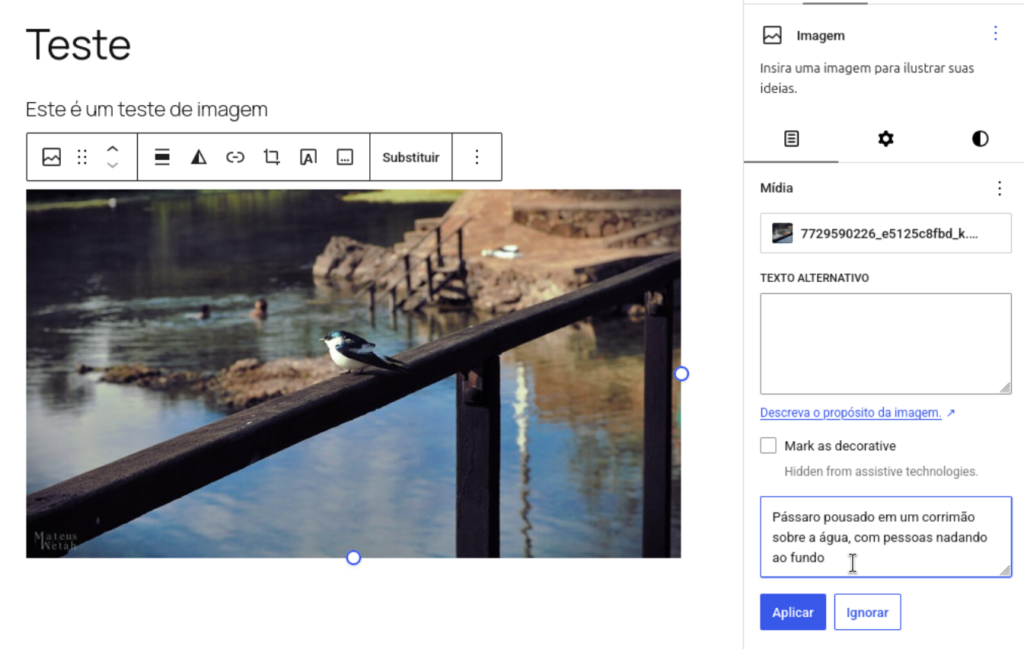
Since the logic behind the WordPress AI plugin is already in place, we don’t see why we shouldn’t bring it into Tainacan as an integration. This means that, just like our integration with ElasticPress, we aren’t reinventing the wheel in our code, but rather using something that’s already available and simply exposing it within the Tainacan interface. This gives us several key advantages right away:
- The WordPress AI plugin is agnostic as to which AI model you’re using. Whether it’s OpenAI, Claude, Gemini, or a custom model trained on your server, it will work through Connectors, a native feature of WordPress 7.0. With this, we hope that more and more open-source solutions and those trained by the institutions themselves can be adopted;
- When using the AI plugin, we have access to other features it offers, such as the ability to use its AI Request Logging screen. In addition, we believe that other features of the plugin may be of interest to Tainacan users, such as editorial notes in posts;
- This allows us to prepare for future integrations with features that this plugin already offers, such as taxonomy generation;
So, here’s what you need to do to use the new feature:
- WordPress 7.0+ with the AI plugin installed;
- An AI connector configured with a model that supports image processing under “Settings” -> “Connections”;
- The “Alternative Text Generation” feature enabled under “Settings” -> “AI” in WordPress;
Once this is done, when you access the item editing page, you’ll see the new option right below the text area:
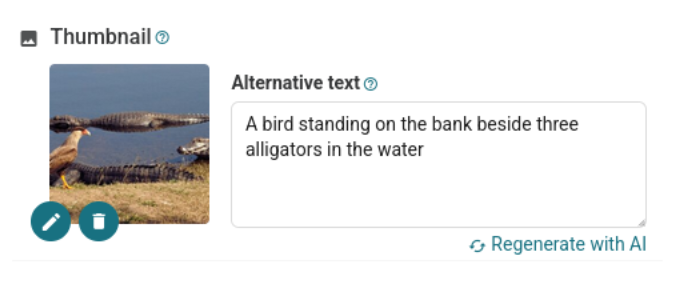
Once the text has been generated, the user can review and edit it as desired. Thanks to the AI plugin, this same functionality will also be available for Documents and Attachments through the WordPress media gallery.
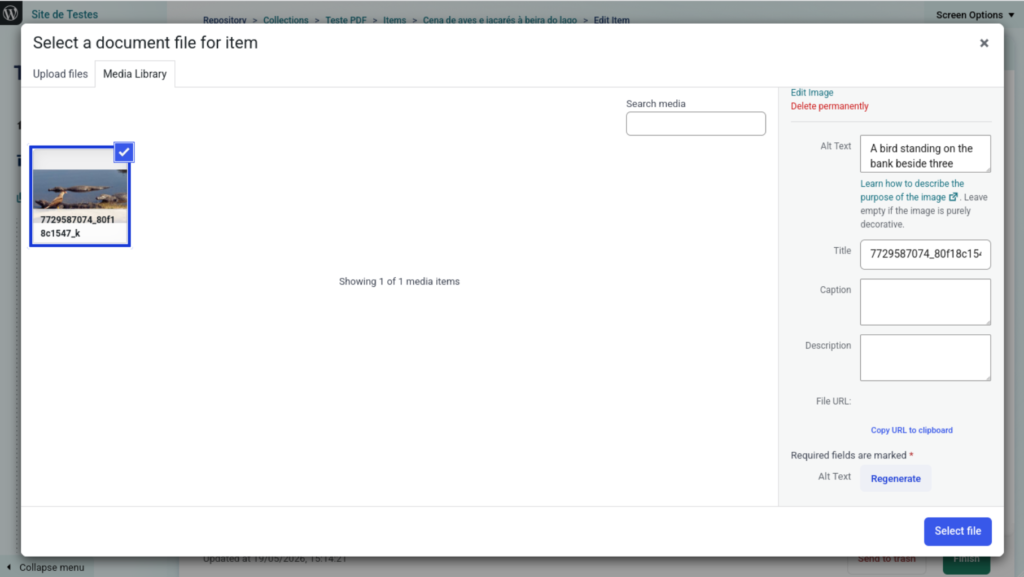
Note: The request made to generate the alternative text sends your image to the server where the AI model configured in the connector is located. Be mindful of your privacy requirements, as in this context it does not matter whether the Tainacan item is public or private: the image will be sent to the server running the AI.
Improvements to the OAI-PMH protocol
Since its earliest versions, Tainacan has always sought to offer features that enable the interoperability of collections. In addition to our REST API, Importers, and Exporters, one of the most powerful ways to do this is through an integration protocol widely used in Europe: OAI-PMH. This protocol, developed by the Open Archives Initiative, provides a standardized way to search for item metadata across a wide variety of collections. Tainacan has always sought to support it, but truth be told, this feature has been neglected in recent years and was so neglected that we stopped announcing support for it.
We are now finally resuming work on this front, with a refactoring of our OAI-PMH endpoint. This means that collectors that implement and understand the protocol can now make requests using the following verbs:
/wp-json/tainacan/v2/oai/?verb=Identify– To obtain information about the repository;/wp-json/tainacan/v2/oai/?verb=ListMetadataFormats– To view the supported metadata standards;/wp-json/tainacan/v2/oai/?verb=ListSets– To view the collections available in the repository;/wp-json/tainacan/v2/oai/?verb=ListRecords– To list the available items;/wp-json/tainacan/v2/oai/?verb=GetRecord– To view a specific item;
The metadata standard initially supported is oai_dc, which will follow the Dublin Core mapping that has been applied to the collection.
These verbs already existed in Tainacan, but they needed several updates and improvements. As a result, we have resumed development of features related to this topic. In the future, we hope to introduce new features such as:
- An OAI-PMH Importer, to also retrieve items from repositories that already implement the protocol;
- An OAI-PMH Exposer, to facilitate access to API methods through the interface;
- A plugin dedicated to the protocol, which allows tracking requests, generating a cache, obtaining collection statistics, and performing usage validations for more advanced administration.
Cover Page of the Taxonomy Term
You may already be familiar with the “Cover Page” feature, which allows you to set a custom page to showcase your collection instead of the existing page that lists the items in the collection. Now this same functionality can be enabled for Taxonomy Terms!
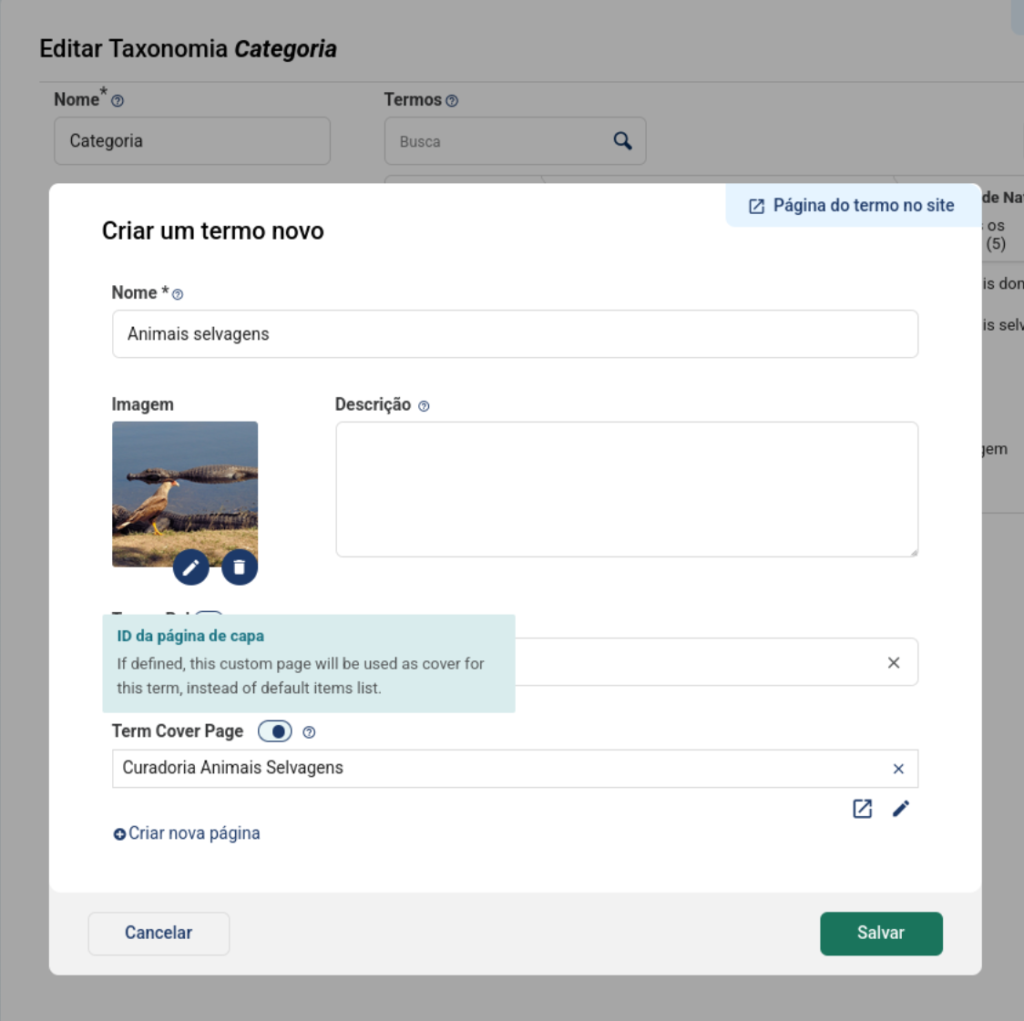
This is a simple yet powerful feature. With a landing page set for a term, any attempt to access a term’s link will lead to a page that can be built entirely using the block editor, rather than the term’s limited list of items. You can create curated pages with more information about that term and use blocks from Tainacan or other plugins to display related items.
Improvements
- The number of items initially loaded per page in collection item listings can finally be modified. This value defaults to 12 but can now be changed in the collection settings, provided the API’s maximum limit is respected (the default is 96, but this can also be changed in the plugin settings);
- The “Show Image” option in the Tainacan Collection Item List block now also affects view modes such as Card, Table, List, and Cards.
- Documents for items with the “Text” type now also appear in advanced search results when searching by document content;
- Clarification in the interface regarding the proper handling of empty multi-valued metadata: They should be removed rather than simply “cleared.”
- Updates to the charts library used in the Reports screens;
Bug fixes
- Displays the breadcrumbs even if the Repository Menu is hidden;
- Prevents styling conflicts in situations where the browser or system has “dark mode” enabled;
- Fixed an incorrect field in the INBCM Museológico mapper;
- Fixed how the internal metadata field
_wp_attached_filewas updated in attachments when an item’s privacy setting changes; - Collection ID was being lost when exiting the selection modal in some Gutenberg blocks;
- The “entity” field is missing in some uses of the Facets Block when loading images;
- Corrections to English strings;
For Developers
Currently, some plugins under development need to update or “auto-fill” metadata values in the item form. In these situations, developers may end up resorting to a strategy of using JavaScript to search for form fields in order to manipulate their data. This does not work well with complex data such as multi-valued metadata and hierarchical taxonomies. A more appropriate approach would be to send values directly to Tainacan’s REST API, using our item metadata endpoint.
Once the request confirms a successful update, it is up to the plugin to instruct Tainacan to reload its interface, displaying the new values. To do this, simply trigger a JavaScript event:
window.dispatchEvent(new CustomEvent('TainacanReloadItemMetadataForm', {
     detail: { itemId: 123, metadatumId: 456 }
}));
In the example, the item with ID 123 and the metadata with ID 456. If a large amount of metadata has been updated, you can trigger an event that reloads the entire item editing screen:
window.dispatchEvent(new CustomEvent('TainacanReloadItemMetadataForm'));In addition, we have some other news for developers:
- Developer documentation is now generated directly from the code and placed in the plugin’s source code repository, inside the
/docsfolder. It will continue to be accessible via our user Wiki, but by keeping it closer to the code, we can improve our automation of documentation for classes, hooks, APIs, etc. To generate these pages, use thegenerate_docs.shscript; - We now have a GitHub Action that monitors changes to the code and runs the script to update the documentation every time a push is made to the develop branch;
- We also have a PR Template on GitHub! This should help new contributors propose changes;
- With the
tainacan_item_supports_document_content_extractionfilter, plugin developers can determine whether the document type of a given item can be extracted. With thetainacan_extract_document_contentfilter, you can enter the extraction flow and perform your own extraction. We plan to update our documentation to cover this flow, but for now, take a look at this comment.
Get it now!
Version 1.2.0 of Tainacan is now available for download from the WordPress plugin repository: