

If the last release was a round of rather specialized updates, this one goes back to something almost everyone who uses Tainacan touches every day: search. Over the past couple of months we have been working on the faceted search, the Advanced Search form, and the way Gutenberg blocks pick items from a collection—plus a few cataloging and importing fixes that several of you reported.
Version 1.3.0 also lands as WordPress 7.1 is rolling out, and we had to make sure our Gutenberg blocks remain compatible with a few changes introduced in it.
If you have been curious about these features, come join us!
What’s new
Add filters as you go
Collections with many filters can make the sidebar feel crowded—especially when some of those filters are only useful once in a while. We wanted a way for visitors (and catalogers) to choose which extra filters to bring in, instead of always seeing the full list.
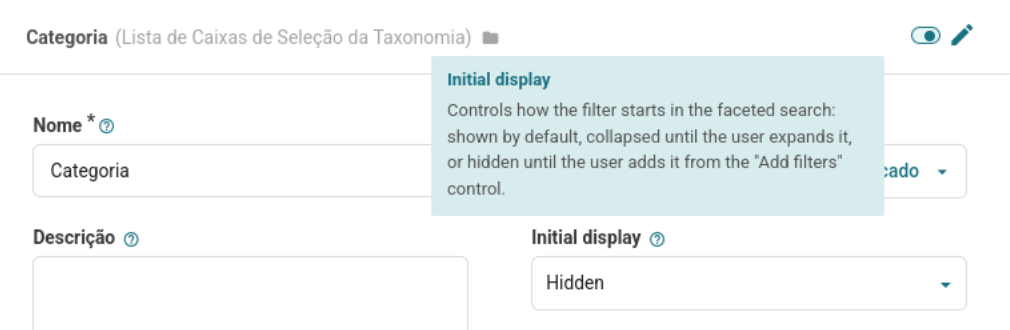
Each filter now has an Initial display option:
- Default — the filter is visible as soon as the list loads (today’s usual behavior);
- Collapsed — the filter is there, but starts closed until someone expands it (this replaces the old “begin collapsed” setting);
- Hidden — the filter stays out of the sidebar until the user adds it.
[Screenshot]
When at least one filter is hidden, an Add filters button appears at the bottom of the faceted search. Opening it lists the hidden filters (grouped by collection on repository-level lists), and picking one reveals it in place, ready to use. You are not creating a new filter there—only showing one that the collection already has.
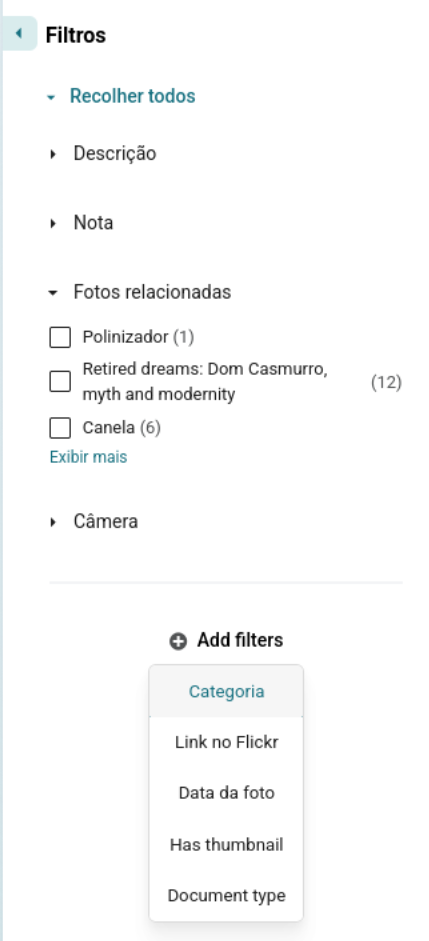
This is a good moment to revisit your filter lists. Keep the everyday filters on Default, and move the long-tail ones to Hidden so the first impression of the collection stays focused.
Preset criteria in Advanced Search
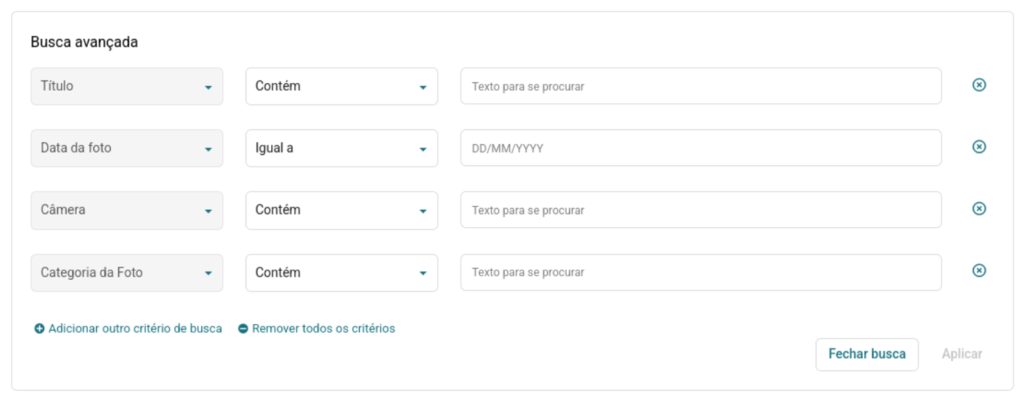
The Advanced Search modal used to open on a fairly cold start: a single empty row, and the job of choosing which metadata to search still ahead of you. That is fine when you only search now and then. It is less fine when a handful of fields are the ones people always reach for.
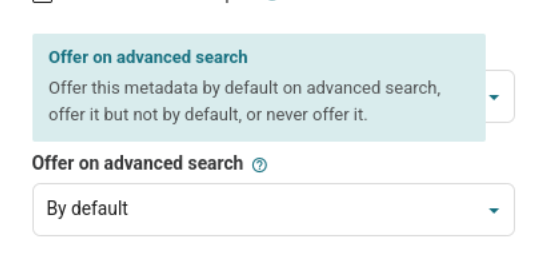
The existing Offer on advanced search option on each metadatum now has three states:
- By default — the field appears already as a criterion when the modal opens;
- Optional — it remains available in the metadata dropdown, but is not pre-built (this is still the default for existing metadata);
- Never — it does not appear in Advanced Search at all.
Empty preset rows are only there to save a click. They are not sent as query parameters until the user actually fills in a value, so opening Advanced Search and closing it again will not change the current results.
“View more” in checkbox filters
Checkbox filters that have more values than max options used to jump straight to a View all modal. That modal is still the right tool for huge vocabularies—and it remains the path for hierarchical taxonomies, where you need to browse the tree. For flatter lists that only go a little beyond the first page, opening a modal felt like overkill.
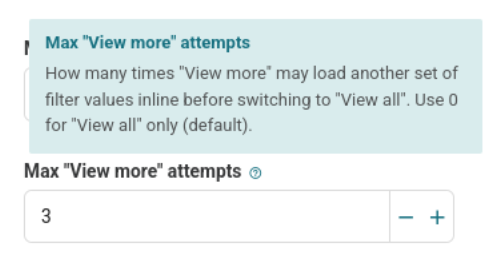
Checkbox filters (text and taxonomy) now have Max “View more” attempts. Leave it at 0 and nothing changes: you only get View all. Set it to a number greater than zero and the filter first offers View more, appending another page of values inline. After that many loads, the link becomes View all and the familiar modal takes over.
Search each word separately—by default, if you want
Tainacan’s textual search has always been a phrase search: typing chair made of wood looks for that whole string. There has long been a control in the interface to switch to a per-word mode (an OR between the words), with quotes still available for an exact phrase. Some users told us they wanted that per-word behavior as the default, not as an extra click.
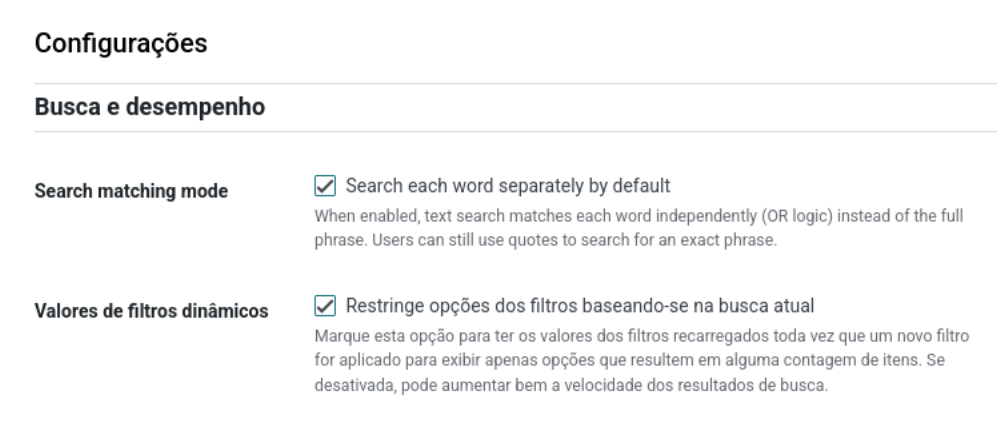
On the plugin Settings screen, under Search and performance, you will find Search each word separately by default. When it is enabled, searches match each word independently, and the interface still explains that quotes keep an exact phrase. Hosts who prefer a constant can set TAINACAN_SEARCH_EACH_WORD_BY_DEFAULT in wp-config.php instead.
More ways to fill in a Selection metadatum
The old Selectbox metadata type is now called Selection. It was already handy inside Compound metadata, or for short closed lists such as Yes/No. What it did not offer was a choice of input: you always got a dropdown, even when two or three radio options would have been clearer.
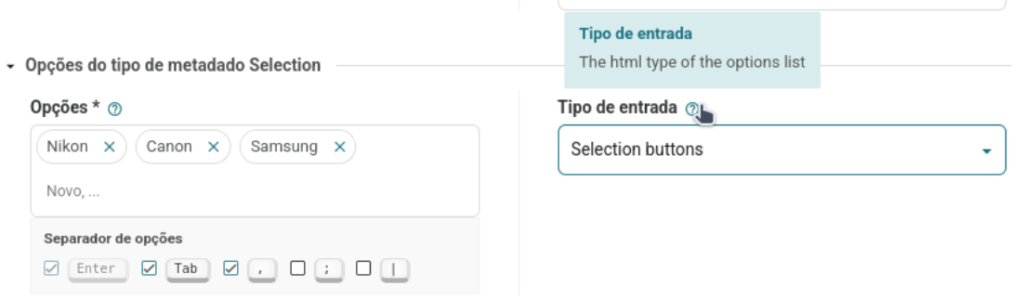
There is now an Input type setting, similar to Taxonomy metadata:
- Selectbox — the original dropdown (still the default);
- Radio / Checkbox — depending on whether the metadatum allows multiple values;
- Selection buttons — the same idea, presented as button-style radios or checkboxes.
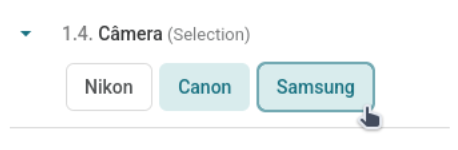
You already know how a checkbox renders, right? Well here is an example with the new “Selection buttons”:
Improvements
Gutenberg selection remembers what you already picked
When you opened an Items List, Carousel, or Gallery block and went back into the selection modal, the list always started fresh. Previously chosen items were unchecked, and confirming a new selection could even duplicate IDs. The modal now receives the current selection, checks those items again, and replaces the block’s list on Apply—so unchecking an item really removes it.
Textual search in Control Metadata facets
Autocomplete and Taginput filters for Control metadata (Collection, Document type, Has thumbnail, and similar) could search the stored values, but not the labels people actually see. Searching for a collection name or “PDF” in those facets now looks at the labels, the same way Taxonomy, Relationship, and User filters already did.
Other enhancements
- Adds
allowfullscreenoption to URL document forced iframe settings; - Updates to our charts library in the reports page, bringing smoother animations and pagination;
- Hides filters section if all its inner filters are hidden;
- Small CSS improvements for horizontal filters;
- English string corrections, including the “fewer elements” notice when ordering item lists by a metadata value;
- And the usual round of internal code tweaks!
Bug fixes
- Gutenberg item selection modals failing in Chrome on WordPress 7.1. The fix required changing how this selection was communicated between components, so if you, as a developer, have used our selection iframes, take a read at the dev section below.
- Opening an item for editing no longer fires a metadata update for empty, single-valued Taxonomy fields (which was also generating extra activity logs);
- CSV files saved as UTF-8 with BOM—the usual Excel export—now have their special columns (
special_item_id,special_document, thumbnail, attachments, status, and so on) detected correctly. The same BOM handling was applied to the Term CSV importer. Thanks to Paulo Henrique for reporting this; - Clearing a CSV mapping back to “Select a metadatum” no longer creates a new metadatum and imports that column. Thanks to Hudson Gomes Arruda for reporting this;
- The frontend Item Gallery was failing to mount when it contained a native video slide with no descendant
<img>element. Thanks to Fred Marvilla (Bauhaus Tech) for reporting and fixing this! - Styling of the stepped layout in the Item Submission Form block, which had broken after recent Buefy class changes;
- Security fixes to prevent SQL injection in the reports endpoint and in the relationship queries (reported by Patchstack);
For developers
We now have a CONTRIBUTING.md in the repository. It covers the GitFlow workflow, branch naming, and how we expect pull requests to land. If you are joining the project—or sending a first patch—start there.
If you embed the admin items list in your own iframe, or reuse the React selection modules, two things changed with WordPress 7.1:
- Do not read
iframe.contentWindow.location. Subscribe to the selectionBroadcastChannelinstead. The flow is documented indocs/react-selection-modules.md; - Pass current IDs with the
existingSelectedItemsprop (orinitiallySelectedItemsonlocation.searchif you own the iframe). Apply should replace the previous ID list, not concatenate it.
Custom metadata types that manage their own multi-value UI (add/remove, tag inputs, and so on) can declare that contract instead of relying on a hardcoded component list in TainacanFormItem. On your metadata type class:
$this->set_manage_multiple_input( true );The flag is exposed on metadata_type_object.manage_multiple_input. Selection metadata overrides it for checkbox-style input types, so a single control can own the whole values array. Taxonomy, Relationship, Compound, User, and GeoCoordinate already set it to true.
Other notes:
- The default textual search matching mode can be filtered with
tainacan-default-search-sentence, or forced with theTAINACAN_SEARCH_EACH_WORD_BY_DEFAULTconstant; - Filters expose
initial_display(default,collapsed,hidden). The oldbegin_with_filter_collapsedattribute is still mapped for older clients, but new code should useinitial_display; - Our PHPUnit matrix now runs on PHP 7.4, 8.3, and 8.4. Thanks to Hudson Gomes Arruda for the extra coverage work toward PHP 8.x.
We also added a new section in our Wiki with some Plugin development suggestions for those wanting to extend Tainacan.
Get it now!
Version 1.3.0 of Tainacan is now available for download from the WordPress plugin repository: