
If version 1.3.0 went back to search, this one is about how items are shown. The Media Gallery—the component that presents documents and attachments on item pages and in Tainacan’s Gutenberg blocks and themes—gained several long-requested layout options. Alongside that, we spent a good amount of time increasing the security of our code, something essential in times of AI bot attacks.
Some of the new gallery options depend on the theme layer. If you use Tainacan Interface or Tainacan Support for Blocksy, update to Interface >= 2.10.0 or Blocksy Support >= 0.5.0 to get the Customizer controls and the matching styles. They both also got a pack of refinements on their Customizer controls, specially for hidding options that don’t have effect under certain context.
If you have been curious about these changes, come join us!
What’s new
A Media Gallery that can treat PDFs as documents, not as a tiny reader
In mixed galleries—photographs next to a PDF—the embedded reader in the main slider has never been a great stage. It fights the height of the carousel, steals clicks meant for the lightbox, and often shows only a cropped first page. At the same time, some sites want that iframe, because the item template is wide and tall enough to be the reader.
There is now a Show PDF cover instead of embedded reader option on the Item Gallery block. When it is on, PDF slides use a preview image—the attachment thumbnail, WordPress’s PDF preview, or a MIME icon—instead of the iframe. The lightbox can still open the actual reader.
On Tainacan Interface 2.10.0 and Tainacan Support for Blocksy 0.5.0, the same choice is available in the Customizer for the item single page.
Expand, Download, and clicks that go to the right place
With the lightbox enabled, any click inside the gallery used to open the zoomed-modal layer. That was reasonable for a photograph you want to zoom. It was a problem for a video, an audio player, or an embedded PDF: the controls you just saw could not be used, because the only action available was opening the extra layer.
From now on, images (and PDF covers, which are images) still open the large viewer on click. Video, audio, and embeds stay interactive for their own controls. To open the lightbox from those slides—or simply to continue the gallery from here—there is a new Expand control, next to Download, in a shared actions row.
The plugin ships these controls as real links and buttons with basic layout-only CSS. Themes restyle the row: Interface 2.10.0 and Blocksy Support 0.5.0 add Customizer options for the download button, the expand button, and the metadata shown on the slide.
Thumbnails as carousel, grid, or list
The thumbnail strip under the main slider is no longer limited to a carousel. In the Item Gallery and Items Gallery blocks, thumbnails can now be displayed as a Carousel (the default), Grid, or List.
Look for Thumbnails settings → Layout in the Item Gallery and Items Gallery blocks. The same three layouts are available in the Interface and Blocksy customizers, including the gallery of related items.
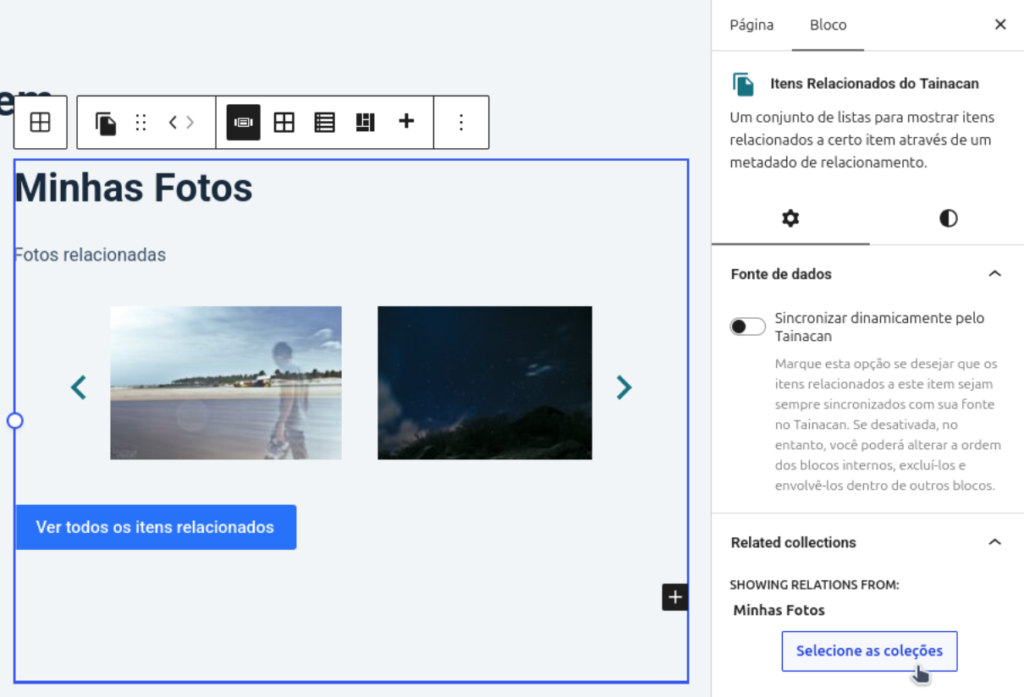
The Related Items List block used to render every relationship group with a single layout. You could insert the block twice, but both instances still listed everything. Item templates often need a carousel for some related collections and a grid for others.
There is now an optional allow-list of collections in the block sidebar. Leave it empty and nothing changes. Fill it, and that instance only shows the relationship groups you picked. Two blocks on the same template can then differ by layout and by which related collections they show.
Title, description, and thumbnail on repository-level lists
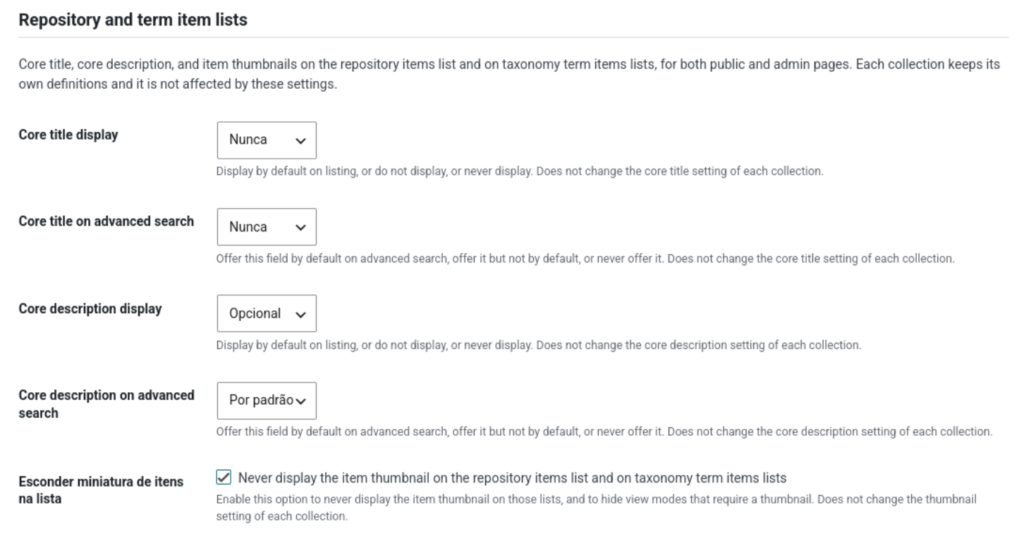
Core Title and Core Description exist on every collection, so repository and taxonomy-term item lists can show them. Until now, though, the collection-level “display” and “offer on advanced search” settings did not apply in that context. Hiding the description on the public repository list, for example, was not something you could do from the collection form.
The plugin Settings screen has a new section, Repository and term item lists. There you can decide whether title, description, and thumbnail appear by default, stay optional, or never appear on those listings—and whether title and description are offered in Advanced Search. Collection metadata settings remain on their respective forms.
Improvements
Better background processes
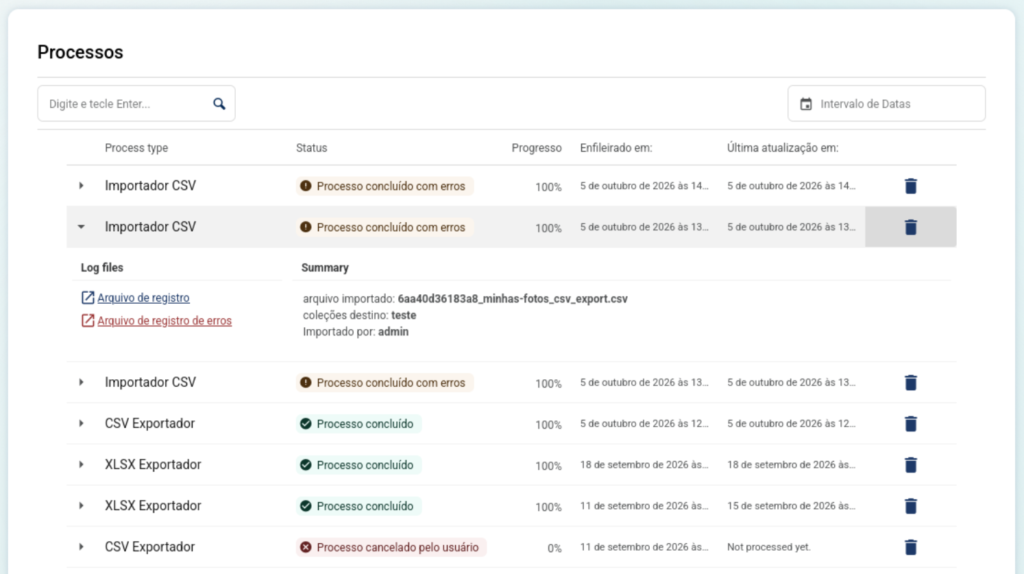
Bulk edit processes that could get stuck (“Waiting creating bulk edit control metadata…”) now have a longer stale timeout, retries, and a more reliable watchdog. To complement these backend improvements, there is a small UI refactor of the Processes table, displaying better the process state:
Other improvements
- CSV files uploaded to the importer are removed when the process finishes or fails, so they do not linger in the media library (and in search-engine indexes);
- Metadata values that used to be wrapped in
<p>(item form, view modes, public templates) now use<div>, so rich HTML inside a value is valid. Interface 2.10.0 and Blocksy Support 0.5.0 update their CSS for that markup; - Optional Prevent videos from preloading under Settings → Search and performance (
preload="none"until the visitor hits play); - Gutenberg block placeholders are simpler;
- Sort-by dropdowns use the custom labels of Core Title and Core Description;
- The “News” card in the dashboard now has links properly translatable;
Security overhaul
This release includes a broad pass with Plugin Check and several security reports (including path traversal on temporary and background-process files, object injection via type options and collection order, tighter REST scope validation, and stripping sensitive user data from Reports). The details will sound technical but the practical result is a stricter admin and REST API.
- Security hardening from Plugin Check and vulnerability reports: prepared SQL, safer filesystem helpers, Recaptcha handling of
REMOTE_ADDR, authenticated path traversal ontmp_fileandbg-processes/file, PHP object injection via metadata/filter type options and collection order, REST API scope checks, and removal of sensitive user fields from the Reports endpoint; - Admin autocompletes, related-item pickers, taxonomy/collection selectors, and the exporter’s collection list paginate and search instead of requesting
nopaging/perpage=-1. The REST API no longer accepts those “load everything” shortcuts; - The Reports screen and endpoint now requires
manage_tainacancapability. - Collection filters marked to appear on repository-level lists can be pulled into that request via a dedicated API parameter;
- And the usual round of internal code tweaks, including ESLint on the JS sources and a Plugin Check pass on background processes, migrations, and bulk edit.
Bug fixes
- Items list failing to load when collection “basics” were not yet in the Vue store;
- Document content modal textarea growing off-screen;
- Audio players in the gallery breaking on Chrome after a slide transition;
- Thumbnail carousel navigation remaining active when there is no main slider;
- Facet search treating a literal
0as empty; - Extra Dublin Core attributes in a mapper breaking the exporter;
- Duplicate wrappers on section descriptions in template tags;
- Item editing form no longer has multivalued inputs sharing the same ID;
- Missing
srcseton some related-items / high-DPI listings; - Vue warnings on the collection settings screen;
- Changing the related collection on a Relationship metadatum no longer clears the other options; already selected related items paginate correctly;
- Blurhash images were making the items list loading take longer than needed;
- Term importer no longer warns on undefined array keys;
- PHPUnit can run against an existing test database.
For developers
Gallery extenders pick up new arguments on tainacan_the_item_gallery() / get_tainacan_item_gallery() (and the Items Gallery equivalent):
coverMimeTypesMain— MIME types that should render a cover in the main slider instead of an embed (e.g.array( 'application/pdf' ));thumbsLayout—carousel(default),grid, orlist. Other slugs are passed through for theme CSS;showDownloadButtonMainand the new Expand control in.tainacan-media-item-actions. Style that wrapper rather than inventing a parallel overlay. Media type information is available so themes can vary the download button per MIME;- Do not assume
pointer-events: noneonvideo,audio, oriframewhen the lightbox is on. Only zoomable slides (images and covers) open PhotoSwipe on click.
Related items:
- Block attribute / PHP arg
relatedCollectionIds(empty = all groups). Filtering happens inTheme_Helper::get_tainacan_related_items_list().
Other notes:
- BlurHash placeholders can be turned off with
TAINACAN_DISABLE_BLURHASHor thetainacan-enable-image-blurhashfilter, and the fade is shorter (200ms). Useful if masonry lists were stalling on the canvas decode; - Metadata and descriptions are
<div>s, not<p>s. If your theme or plugin targetedpinside Tainacan metadata, update the selectors (Interface 2.10.0 and Blocksy Support 0.5.0 already do); - REST list endpoints no longer honor
nopagingorperpage=-1. Page through results. - Batch taxonomy term operations are capped by
TAINACAN_API_MAX_BATCH_TERMS(default 200); - Repository-level filter requests can append collection filters that have
display_in_repository_level_listsset, viaappend_from_collections; - Reports require
manage_tainacan;bg-processes/filedoes too; - Gutenberg scripts now rely on WordPress’s
createElement/ Fragment (React 19-ready) instead of bundling their own React; - ESLint runs on the JavaScript sources in the webpack build.
New contributors
As you can see, this release includes a lot of small under-the-hood features and fixes that were only possible due to amazing new contributors like:
Welcome guys!
Get it now!
Version 1.4.0 of Tainacan is now available for download from the WordPress plugin repository, along with Tainacan Interface 2.10.0 and Tainacan Support for Blocksy 0.5.0: